6 Vector Geometries
Spatial vector data represent the world as a collection of points which, for two-dimensional data, are stored as \(x\) and \(y\) coordinates.
suppressPackageStartupMessages(library(tidyverse))
library(sf)
#> Linking to GEOS 3.7.1, GDAL 2.4.2, PROJ 5.2.0
theme_spatial <- theme_minimal(base_family = "serif") +
theme(axis.text = element_blank(), axis.title = element_blank(),
axis.ticks = element_blank(), panel.grid = element_blank(),
plot.title = element_text(hjust = 0.5))
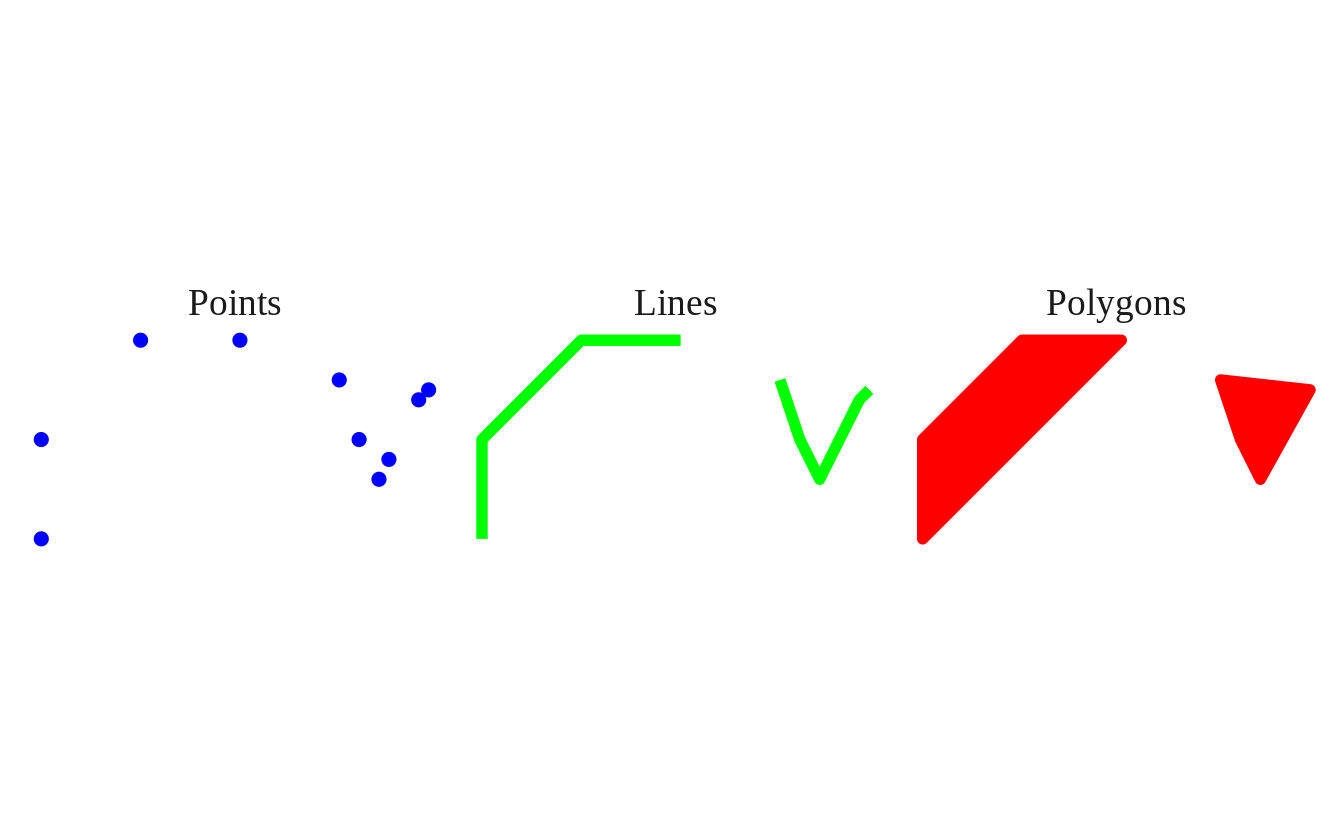
theme_set(theme_spatial)Points can be joined in order to make lines, which themselves can be joined to make polygons.
practice_coords <- tibble(
  lng = c(-20, -20, -10, -10, 20, 20,  10,  10),
  lat = c(-20, 10, 20, -10, -10,  10,  20, -20),
  lab = c("A", "B", "C", "D", "E", "F", "G", "H"),
  grp = c("a", "a", "a", "a", "b", "b", "b", "b")
)

practice_coords
#> # A tibble: 8 x 4
#>     lng   lat lab   grp
#>   <dbl> <dbl> <chr> <chr>
#> 1   -20   -20 A     a
#> 2   -20    10 B     a
#> 3   -10    20 C     a
#> 4   -10   -10 D     a
#> 5    20   -10 E     b
#> 6    20    10 F     b
#> 7    10    20 G     b
#> 8    10   -20 H     b
6.1 POINT
POINT refers to the location of a single point in space.
Here, we use st_as_sf() to convert a regular data.frame into an sf object.
- Steps:
- take
practice_coords - convert to
sfobject withst_as_sf(), providing acharactervectorindicating thenamesofpractice_coordsin \((x, y)\) / \((longitude, latitude)\) order mutate()to a add a column namedshape, which we obtain usingst_geometry_type().
- take
point_sf <- practice_coords %>%                     # Step 1.
  st_as_sf(coords = c(x = "lng", y ="lat")) %>%     # 2.
  mutate(shape = st_geometry_type(geometry))        # 3.

point_sf
#> Simple feature collection with 8 features and 3 fields
#> geometry type:  POINT
#> dimension:      XY
#> bbox:           xmin: -20 ymin: -20 xmax: 20 ymax: 20
#> CRS:            NA
#> # A tibble: 8 x 4
#>   lab   grp    geometry shape
#> * <chr> <chr>   <POINT> <fct>
#> 1 A     a     (-20 -20) POINT
#> 2 B     a      (-20 10) POINT
#> 3 C     a      (-10 20) POINT
#> 4 D     a     (-10 -10) POINT
#> 5 E     b      (20 -10) POINT
#> 6 F     b       (20 10) POINT
#> 7 G     b       (10 20) POINT
#> 8 H     b      (10 -20) POINT
The data in our lng and lat columns are moved to a new geometry column.
ggplot(data = point_sf) +
  geom_sf(aes(color = lab), size = 5, show.legend = "point") +
  labs(title = "POINT")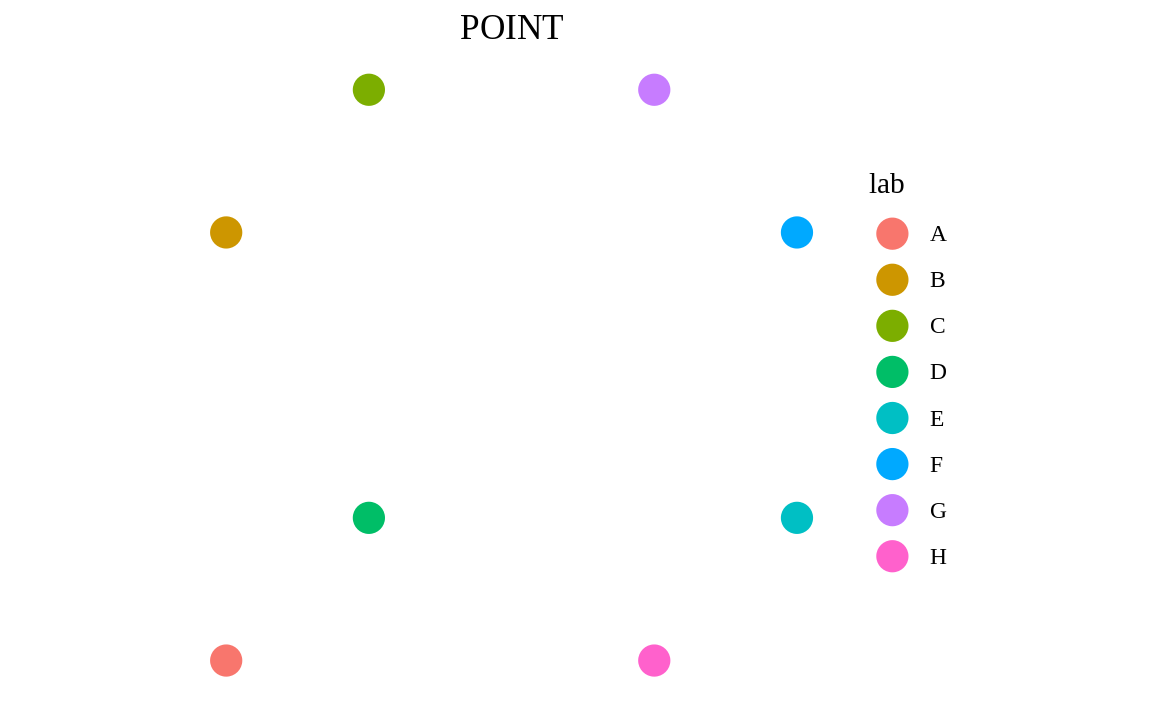
6.2 MULTIPOINT
MULTIPOINT refers to a collection of POINTs.
- Steps:
- take
point_sf - using
group_by(), group the rows together based on the values in theirgrpcolumn summarise()each group, which combines the points of each group into aMULTIPOINTmutate()theshapecolumn to change it to the newst_geometry_type()
- take
multi_point_sf <- point_sf %>%               # Step 1.
  group_by(grp) %>%                          # 2.
  summarise() %>%                            # 3.
  mutate(shape = st_geometry_type(geometry)) # 4.
#> `summarise()` ungrouping output (override with `.groups` argument)

multi_point_sf
#> Simple feature collection with 2 features and 2 fields
#> geometry type:  MULTIPOINT
#> dimension:      XY
#> bbox:           xmin: -20 ymin: -20 xmax: 20 ymax: 20
#> CRS:            NA
#> # A tibble: 2 x 3
#>   grp                                     geometry shape
#> * <chr>                               <MULTIPOINT> <fct>
#> 1 a     ((-20 -20), (-20 10), (-10 -10), (-10 20)) MULTIPOINT
#> 2 b         ((10 -20), (10 20), (20 -10), (20 10)) MULTIPOINT
Instead of the 8 separate POINTs with which we started, we now have 2 rows of MULTIPOINTs, each of which contain 4 points.
ggplot(data = multi_point_sf) +
  geom_sf(aes(color = grp), size = 5, show.legend = "point") +
  labs(title = "MULTIPOINT")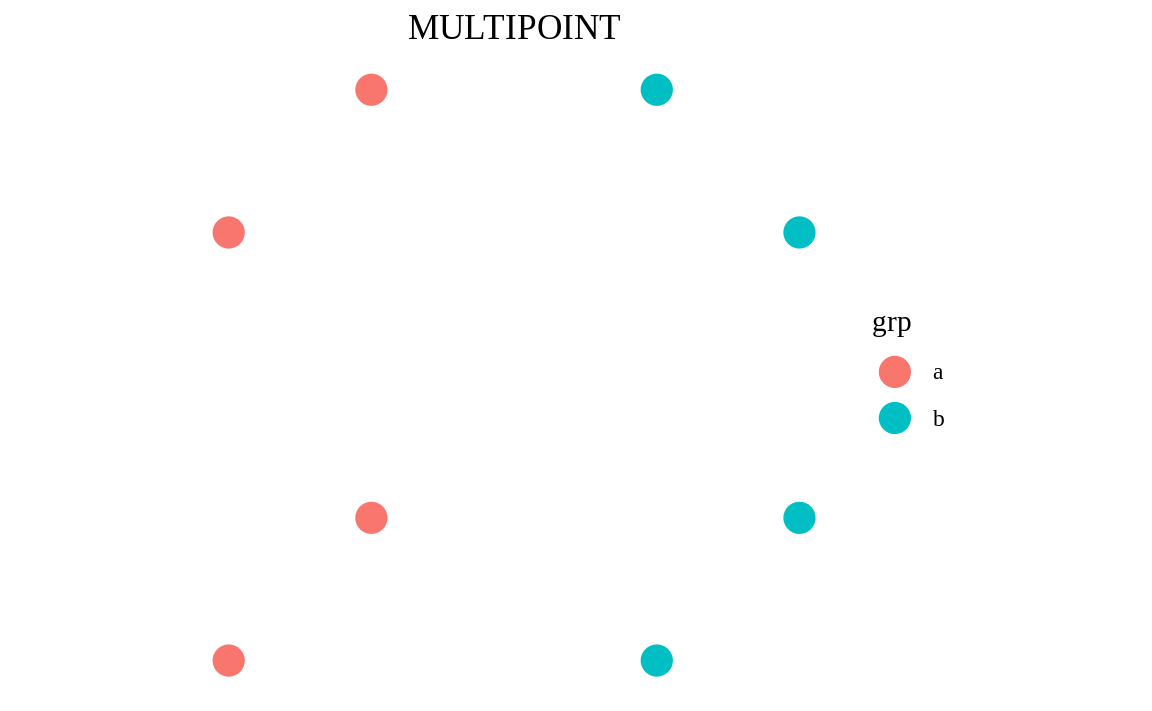
6.3 LINESTRING
LINESTRING is how we represent individual lines.
- Steps:
- take
multi_point_sf - cast the
geometryto=LINESTRINGusingst_cast()3mutate()theshapecolumn to change it to the newst_geometry_type()
- take
linestring_sf <- multi_point_sf %>%          # Step 1.
  st_cast(to = "LINESTRING") %>%             # 2.
  mutate(shape = st_geometry_type(geometry)) # 3.

linestring_sf
#> Simple feature collection with 2 features and 2 fields
#> geometry type:  LINESTRING
#> dimension:      XY
#> bbox:           xmin: -20 ymin: -20 xmax: 20 ymax: 20
#> CRS:            NA
#> # A tibble: 2 x 3
#>   grp   shape                                geometry
#> * <chr> <fct>                            <LINESTRING>
#> 1 a     LINESTRING (-20 -20, -20 10, -10 -10, -10 20)
#> 2 b     LINESTRING     (10 -20, 10 20, 20 -10, 20 10)
Now we have 2 rows that each contain a LINESTRING, which was built by connecting each point to the next.
ggplot(data = linestring_sf) +
  geom_sf(aes(color = grp), size = 2, show.legend = "line") +
  labs(title = "LINESTRING")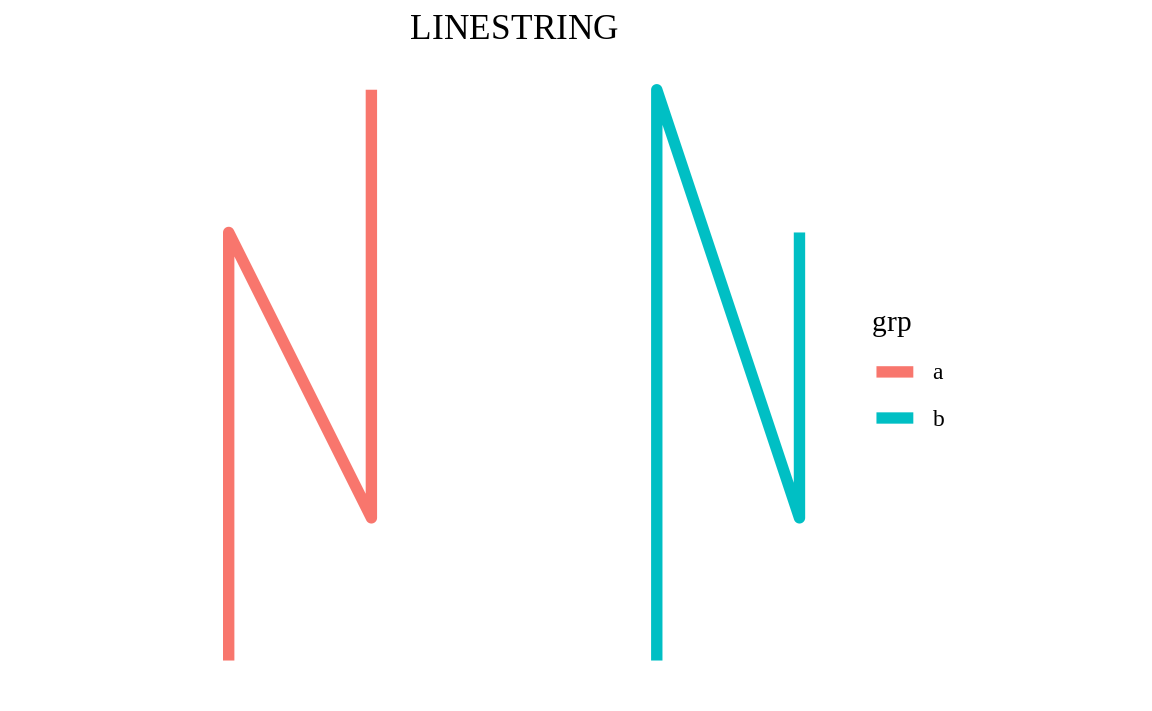
6.4 MULTILINESTRING
Similar to MULTIPOINTs that contain multiple points, we also have MULTILINESTRINGs.
- Steps:
- take
linestring_sf summarise()the rows, combining them all into a singleMULTILINESTRINGmutate()theshapecolumn to change it to the newst_geometry_type()and replace thegrpcolumn that is dropped when wesummarise()without usinggroup_by()
- take
multi_linestring_sf <- linestring_sf %>%     # Step 1.
  summarise() %>%                            # 2.
  mutate(shape = st_geometry_type(geometry), # 3.
         grp = "multi")                      # 4.

multi_linestring_sf
#> Simple feature collection with 1 feature and 2 fields
#> geometry type:  MULTILINESTRING
#> dimension:      XY
#> bbox:           xmin: -20 ymin: -20 xmax: 20 ymax: 20
#> CRS:            NA
#> # A tibble: 1 x 3
#>                                                               geometry shape           grp
#> *                                                    <MULTILINESTRING> <fct>           <chr>
#> 1 ((-20 -20, -20 10, -10 -10, -10 20), (10 -20, 10 20, 20 -10, 20 10)) MULTILINESTRING multi
Now we have 2 lines embedded inside a single MULTILINESTRING row.
ggplot(data = multi_linestring_sf) +
  geom_sf(aes(color = grp), size = 2, show.legend = "line") +
  labs(title = "MULTILINESTRING")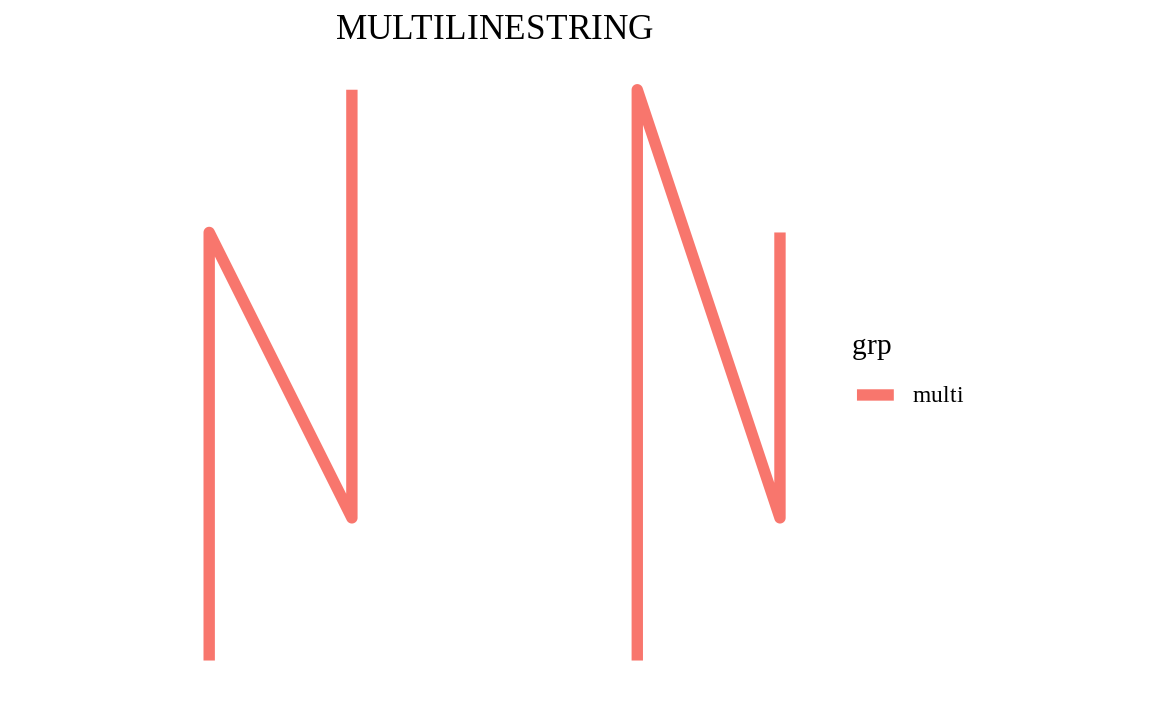
6.5 POLYGON
POLYGONs are essentially sets of lines that close to form a ring, although POLGYONs can also contain holes. We can easily wrap a shape around any geometry using st_convex_hull() to form a convex hull polygon.
- Steps:
- take
point_sf - using
group_by(), group the rows together based on the values in theirgrpcolumn summarise()each group, combining them intoMULTIPOINTs- wrap the
MULTIPOINTs in a polygon usingst_convex_hull() mutate()theshapecolumn to change it to the newst_geometry_type()
- take
polygon_sf <- point_sf %>%                   # Step 1.
  group_by(grp) %>%                          # 2.
  summarise() %>%                            # 3.
  st_convex_hull() %>%                       # 4.
  mutate(shape = st_geometry_type(geometry)) # 5.
#> `summarise()` ungrouping output (override with `.groups` argument)

polygon_sf
#> Simple feature collection with 2 features and 2 fields
#> geometry type:  POLYGON
#> dimension:      XY
#> bbox:           xmin: -20 ymin: -20 xmax: 20 ymax: 20
#> CRS:            NA
#> # A tibble: 2 x 3
#>   grp                                        geometry shape
#> * <chr>                                     <POLYGON> <fct>
#> 1 a     ((-20 -20, -20 10, -10 20, -10 -10, -20 -20)) POLYGON
#> 2 b ((10 -20, 10 20, 20 10, 20 -10, 10 -20)) POLYGONggplot(data = polygon_sf) +
geom_sf(aes(fill = grp), show.legend = "polygon") +
labs(title = "POLYGON")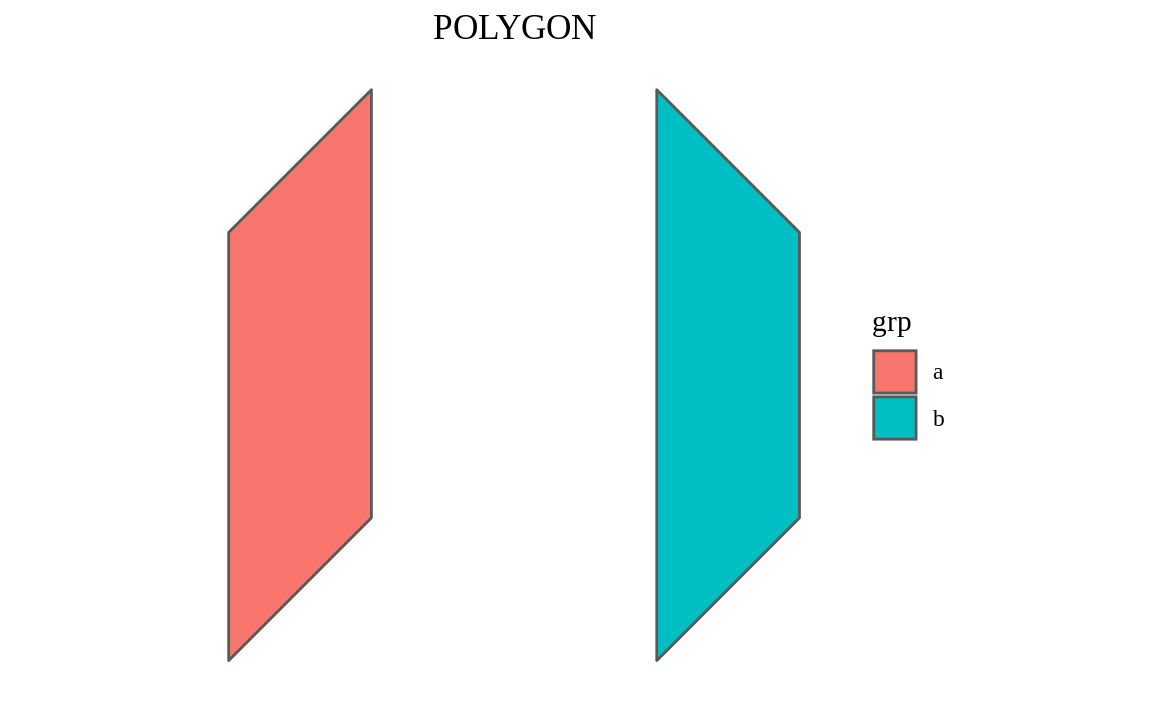
6.6 MULTIPOLYGON
POLYGONs can also be grouped together to form MULTIPOLYGONs.
- Steps:
- take
polygon_sf summarise()the rows, combining them all into a singleMULTILIPOLYGONmutate()theshapecolumn to change it to the newst_geometry_type()and replace thegrpcolumn that is dropped when wesummarise()without usinggroup_by()
- take
multi_polygon_sf <- polygon_sf %>%           # Step 1.
  summarise() %>%                            # 2.
  mutate(shape = st_geometry_type(geometry), # 3.
         grp = "multi")

multi_polygon_sf
#> Simple feature collection with 1 feature and 2 fields
#> geometry type:  MULTIPOLYGON
#> dimension:      XY
#> bbox:           xmin: -20 ymin: -20 xmax: 20 ymax: 20
#> CRS:            NA
#> # A tibble: 1 x 3
#>                                                                       geometry shape      grp
#> *                                                               <MULTIPOLYGON> <fct>      <chr>
#> 1 (((-20 -20, -20 10, -10 20, -10 -10, -20 -20)), ((10 -20, 10 20, 20 10, 20 … MULTIPOLY… multiggplot(data = multi_polygon_sf) +
geom_sf(aes(fill = grp), show.legend = "polygon") +
labs(title = "MULTIPOLYGON")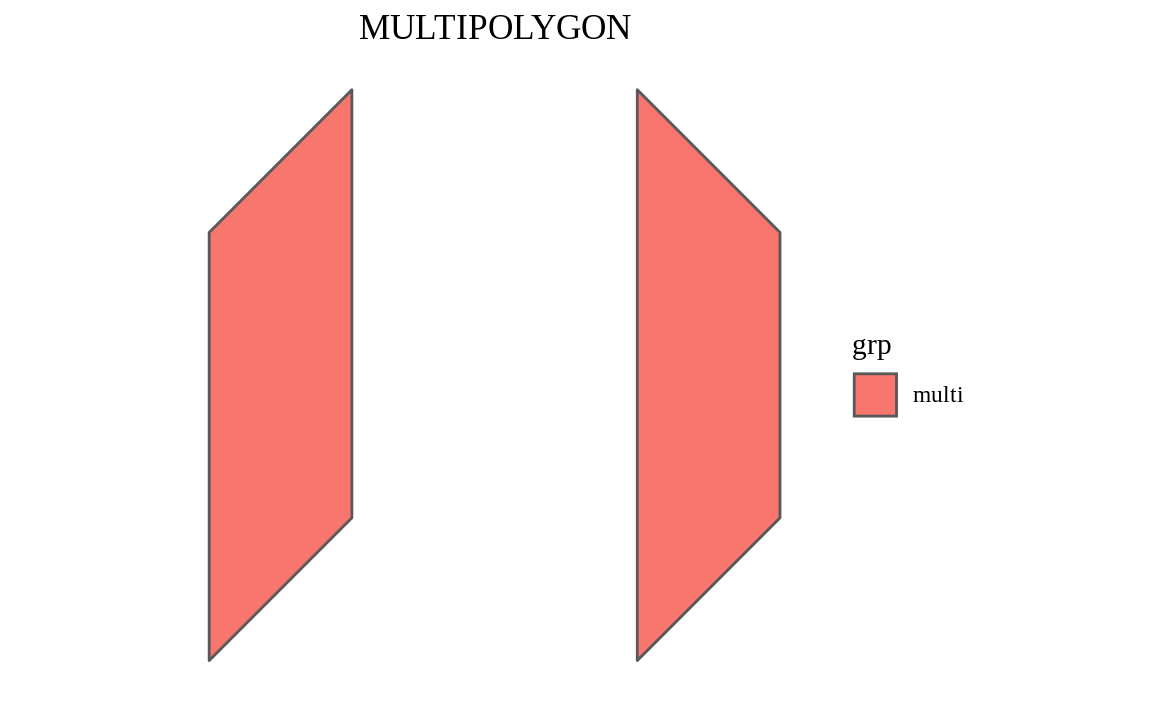
6.7 GEOMETRY
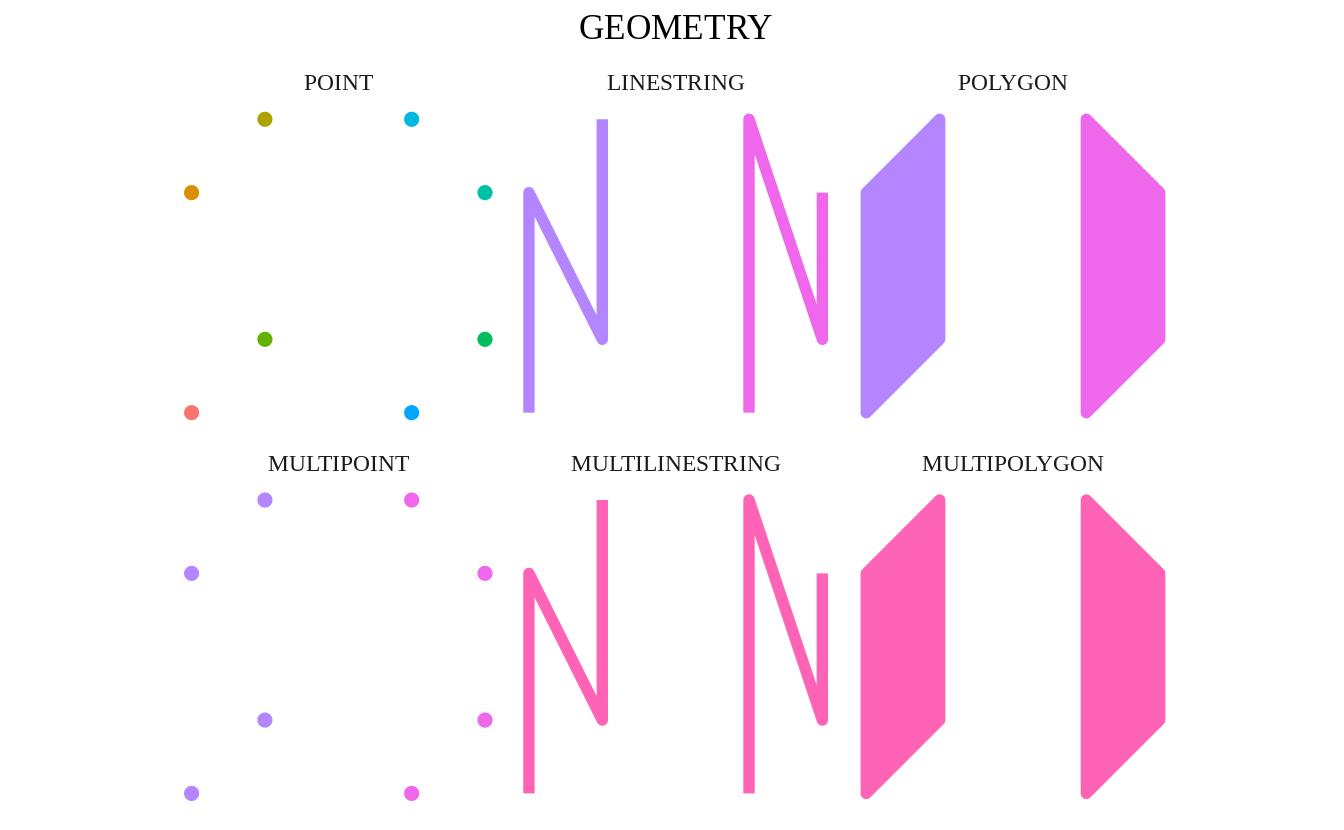
GEOMETRY is a special geometry type. It refers to a column of mixed geometries, i.e. we have multiple geometry types in our geometry column.
geometry_sf <- list(point_sf, multi_point_sf, linestring_sf,
                    multi_linestring_sf, polygon_sf, multi_polygon_sf) %>%
  map_if(~ "lab" %in% names(.x), select, -lab) %>%
  do.call(what = rbind) %>%
  mutate(grp = if_else(shape == "POINT", as.character(row_number()), grp))

geometry_sf
#> Simple feature collection with 16 features and 2 fields
#> geometry type:  GEOMETRY
#> dimension:      XY
#> bbox:           xmin: -20 ymin: -20 xmax: 20 ymax: 20
#> CRS:            NA
#> # A tibble: 16 x 3
#>    grp                                                                    geometry shape
#>  * <chr>                                                                <GEOMETRY> <fct>
#>  1 1                                                               POINT (-20 -20) POINT
#>  2 2                                                                POINT (-20 10) POINT
#>  3 3                                                                POINT (-10 20) POINT
#>  4 4                                                               POINT (-10 -10) POINT
#>  5 5                                                                POINT (20 -10) POINT
#>  6 6                                                                 POINT (20 10) POINT
#>  7 7                                                                 POINT (10 20) POINT
#>  8 8                                                                POINT (10 -20) POINT
#>  9 a                         MULTIPOINT ((-20 -20), (-20 10), (-10 -10), (-10 20)) MULTIPOINT
#> 10 b                             MULTIPOINT ((10 -20), (10 20), (20 -10), (20 10)) MULTIPOINT
#> 11 a                                 LINESTRING (-20 -20, -20 10, -10 -10, -10 20) LINESTRING
#> 12 b                                     LINESTRING (10 -20, 10 20, 20 -10, 20 10) LINESTRING
#> 13 multi MULTILINESTRING ((-20 -20, -20 10, -10 -10, -10 20), (10 -20, 10 20, 20 … MULTILINEST…
#> 14 a                         POLYGON ((-20 -20, -20 10, -10 20, -10 -10, -20 -20)) POLYGON
#> 15 b                              POLYGON ((10 -20, 10 20, 20 10, 20 -10, 10 -20)) POLYGON
#> 16 multi MULTIPOLYGON (((-20 -20, -20 10, -10 20, -10 -10, -20 -20)), ((10 -20, 1… MULTIPOLYGONggplot(data = geometry_sf) +
geom_sf(aes(color = grp, fill = grp), size = 2, show.legend = FALSE) +
facet_wrap(~ shape, nrow = 2) +
labs(title = "GEOMETRY")